What CrashLoopBackOff actually means
The pod’s container keeps exiting shortly after it starts. CrashLoopBackOff is not a second error — it is the waiting time Kubernetes has inserted between restarts, doubling with each failure up to five minutes. The backoff is working as designed; the container is not.
That distinction matters when you are on call at 3am. The status line tells you that it keeps dying. Only the previous container’s exit, the events and the logs tell you why — and there are really only six answers.
The six causes that make a pod loop
- 01
It cannot read its config
A missing ConfigMap or Secret key, or a variable the app refuses to start without. The app usually exits within seconds, with the name of the missing thing in its last log line.
- 02
It crashes on boot
A panic, an unhandled error, a syntax or deserialisation failure in an injected file. Exit code 1 or 2, a stack trace on the last line, fresh deploys the most likely trigger.
- 03
It gets OOMKilled
Exit code 137,
“reason”: “OOMKilled”in the last state. The container asks for more memory than its limit; Kubernetes kills it before it can log anything useful. - 04
A probe keeps failing
A startup or liveness probe that fails right after the container comes up. kubelet restarts it on schedule, so the loop looks perfectly, suspiciously regular.
- 05
The image is wrong or unreachable
ErrImagePull becomes ImagePullBackOff rather than a crash loop — but a bad tag or entrypoint inherited from the base image shows up as an instant exit with no logs at all.
- 06
A dependency is not up yet
The app connects to a database, a cache or an auth issuer at start, finds it down or changed, and exits. The failure is in another namespace entirely.
Six causes, one status line. The first minute of diagnosis is deciding which of the six you are looking at — not reading the same restart counter again.
Diagnose it from the first minute
Four commands separate all six causes. They are the same order every time, because each answer routes you to exactly one cause list.
kubectl get pods -n prod
kubectl describe pod <pod> -n prod
kubectl logs <pod> -n prod --previous
kubectl get events -n prod --sort-by=.lastTimestamp | tail -20
Read them as a decision tree. Last state shows OOMKilled → cause 03. An exit code with a stack trace → cause 02. Completed or empty logs with an instant exit → cause 05. Probe failures in the events → cause 04. “config key missing” in the logs → cause 01. A connection refused to a named service → cause 06.
What takes a tired engineer two minutes should not become a wiki page. Pin these four commands at the top of the runbook, each with what its output means — the runbook is a router, not an essay.
Verify the fix actually stuck
Deleting the pod is the fix’s start, not its end. After each change:
- Run
kubectl delete pod <pod> -n prodand wait one restart cycle. - Confirm STATUS: Running and READY: 1/1 — and then again five minutes later, because restarts that succeed on the first cycle still fail on the second.
- Check the events are quiet: no new Back-off restarting lines since your change.
- Assume nothing until the next deploy: a pod that only survives on a manually edited environment variable is a rollback waiting to happen.
Stop it coming back
Every loop has a shape the cluster already told you about before it started:
- Pin probes to what the app actually does on boot — give startup probes room for the slow path, not the average one.
- Set memory requests and limits from measured usage, not from the year the chart was written.
- Run config and secret references through CI against the manifest, not first contact at 3am.
- Alert on restarts, not on the crash: a pod that restarts and “recovers” loops silently for days.
- Give every app a declared readiness dependency order — the ones that boot into a loop because Postgres is doing its own migration are the same incident you have already seen.
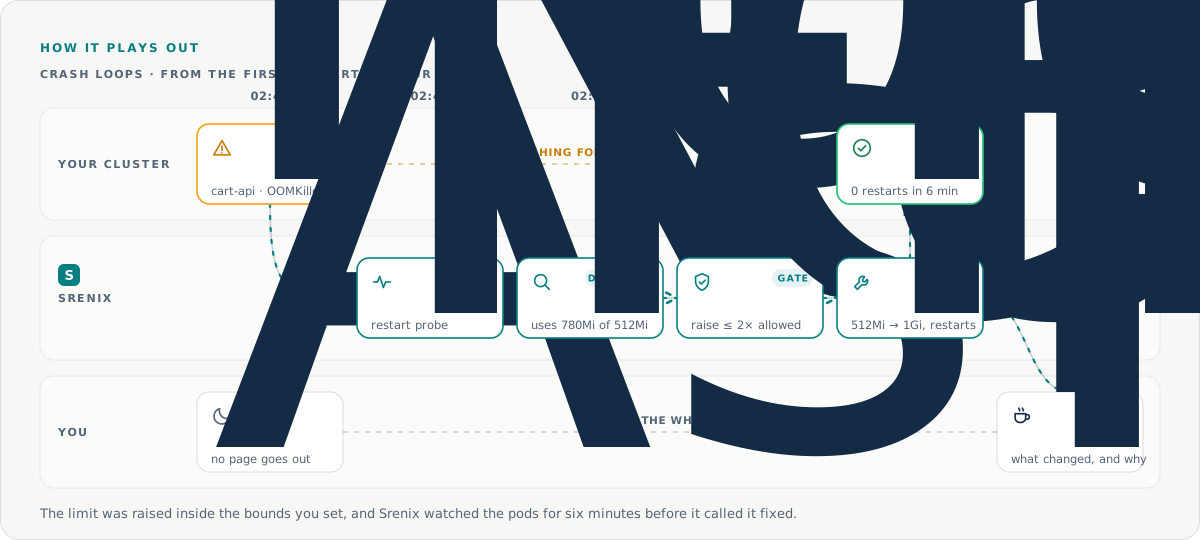
Srenix is built for exactly this shape of incident. It notices the loop, runs the same four commands against the cluster, matches the failure against the six causes, applies the bounded fix and re-checks on the schedule the pod should have failed on — so the loop is confirmed gone, not assumed gone.