Security
It runs where your cluster runs.
No telemetry leaves your perimeter, the licence check opens no socket, and every action is written to a log you can verify yourself.
Nothing is exfiltrated
Srenix is an in-cluster operator, not a SaaS that pulls your telemetry. Cluster data and model prompts stay inside your perimeter, and you choose the model endpoint.
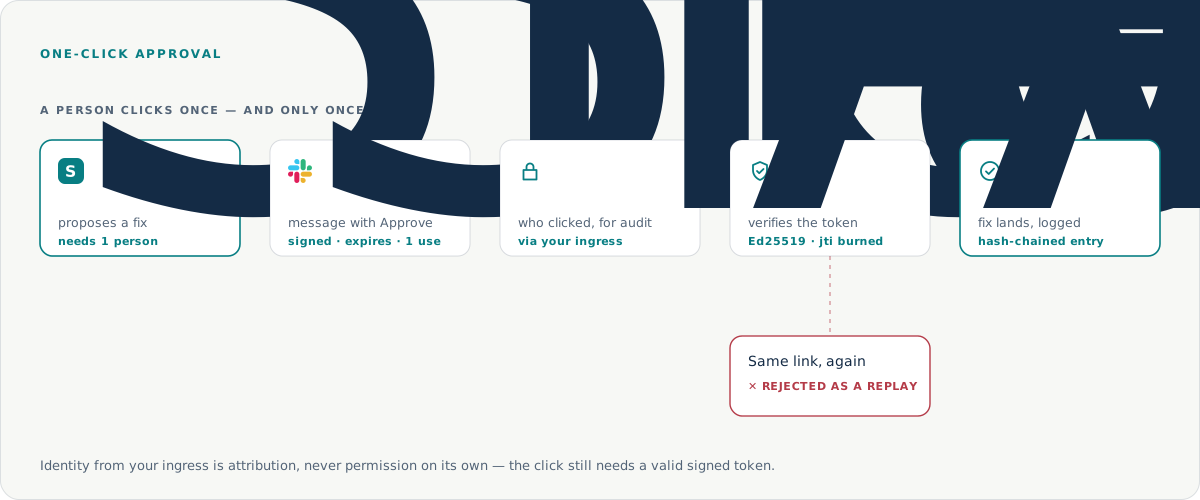
Approvals are signed and single-use
An action that needs a person is posted with a signed link that expires and can be used exactly once. A second use is rejected as a replay. Who may click is decided by your own SSO.
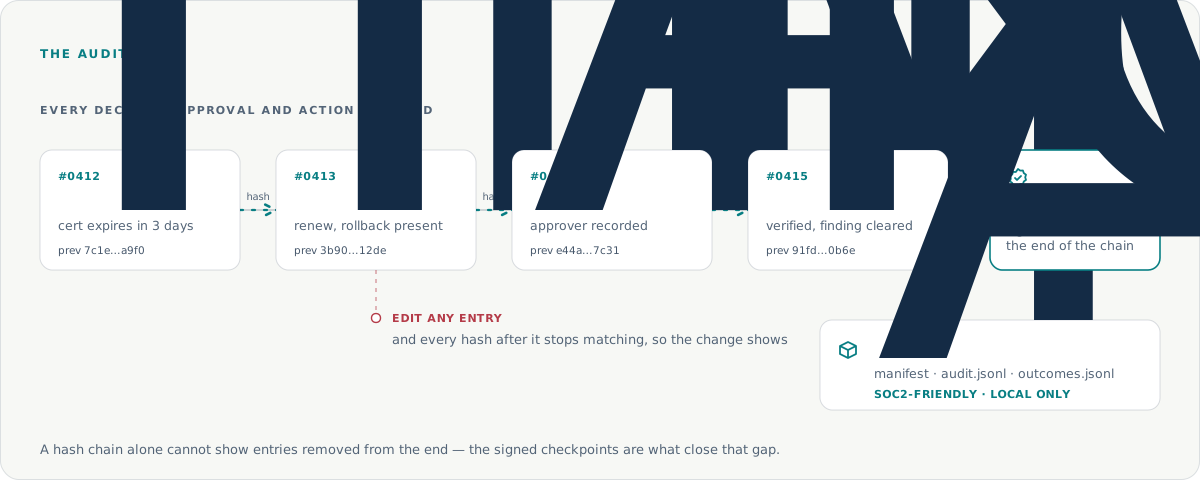
The audit trail is hash-chained
Every decision, approval and action is hash-linked, so an entry cannot be altered without breaking the chain. Signed checkpoints close the gap a hash chain leaves open: entries removed from the end.
Guardrail reference
Every rule that limits what it can do.
Not a policy page: each of these is enforced in code you can read before you install.
Fixers with limits
Five built-in fixers, each with one job: delete a failed pod, stop a frozen job, restart a stuck ReplicaSet, remove a finished certificate request and, only if you allow it, point an Ingress at the right TLS secret. Each says what it may touch and in which namespaces. There is no open shell.
Approvals
Anything outside your rules waits for a person: one signed link that expires and works once, and your SSO decides who may click it. How approvals work
Earned autonomy
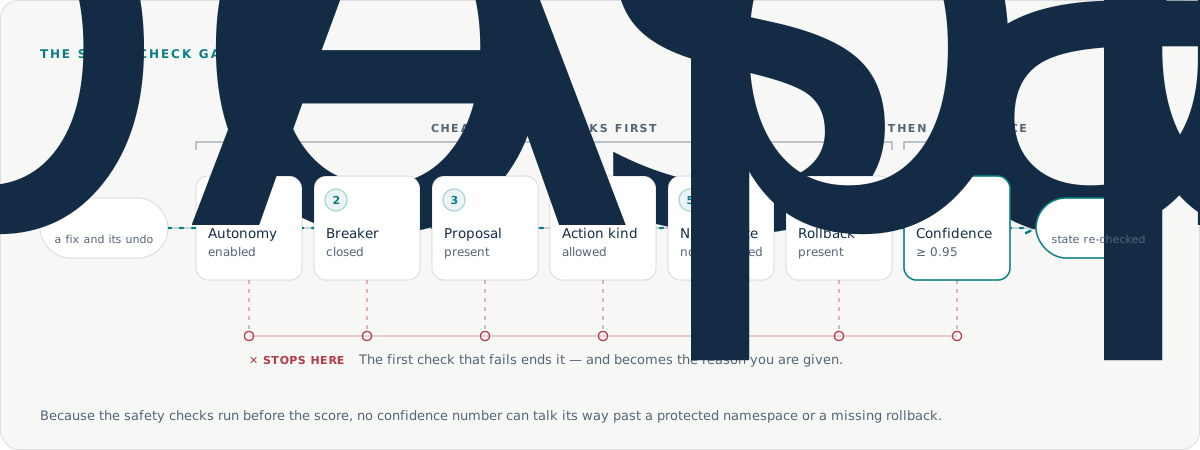
A kind of fix gets more freedom only after it keeps working on your clusters. A fix that is reverted later counts as a failure, and a circuit breaker returns that kind of fix to manual approval. The seven checks
The record
Every detection, decision, approval and action is signed and hash-chained to the one before it, so any change to the record shows. Read the audit trail
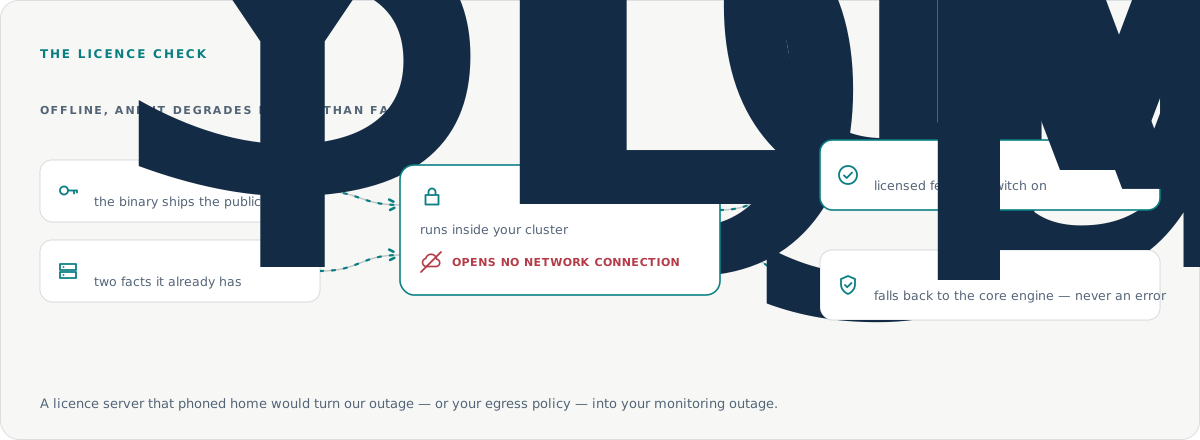
The licence check opens no network connection
It reads a signed key and two facts it already has from your API server. A licence server that phoned home would turn our outage, or your egress policy, into your monitoring outage. The commercial binary ships the public key only.
Autonomy is off until you turn it on
A fresh install finds and explains. It changes nothing until you enable autonomy and choose which kinds of change it may make — and an empty list of allowed actions means autonomy is off, because there is no implicit “all kinds”.
Lock down direct access to approvals
Traffic reaching the approval service without passing your ingress can claim any identity, because identity arrives from the ingress and is used for audit attribution. The network policy that closes this is opt-in, because a fail-closed policy with the wrong selector would silently break every approval click.
What must be true before it changes anything
When a person has to say yes
What it writes down
What the licence check touches
Trust centre
What your security review needs, in one place.
Security overview
A short document for your security team, covering the architecture, the guardrails and the audit trail. We send it with the review. Ask for it
Licence
Design Partners use Srenix under their programme agreement; Enterprise runs under a commercial licence. The source code is available to customers for security review. Licensing in the docs
Data handling
No telemetry leaves your network. Reports go only where you point them — Slack, Alertmanager, your ticketing — and you choose the model endpoint.
Compliance status
SOC 2: not yet certified. The evidence exists today: a signed, hash-chained audit trail, and Enterprise exports a SOC 2-friendly audit bundle.
Does any of our data leave the cluster?
No. Srenix runs inside your cluster and sends no telemetry out. Its optional AI features use the model endpoint you choose — host that model inside your perimeter and the prompts stay there too.
Which AI model does it use?
The one you choose: any OpenAI-compatible endpoint, including a model you host in the cluster with vLLM. Most findings are explained by rules alone — the model is the fallback, not the default.
Does it touch our secrets?
It never reads or writes a secret value. When a key is missing, it can only ask your secret store to sync the key it already holds.
Can it change things without asking us?
Only if you let it. A fresh install finds and explains, and changes nothing. You choose which kinds of fix it may make on its own and in which namespaces; it acts alone only when all seven checks pass with confidence of at least 0.95. Everything else waits for one tap in Slack.
Are you SOC 2 certified?
Not yet. What exists today is the evidence: every decision, approval and action is signed and hash-chained, and Enterprise exports a SOC 2-friendly audit bundle. Certification is the next step.
Does it work air-gapped?
Yes. Srenix runs from a snapshot, offline or air-gapped, and the licence check never opens a network connection. Enterprise adds an air-gapped installer.
Need this to clear your security review?
We will go through the audit trail, the approval flow and the licence check with your team, line by line.