

Replacing a node that hosts a database replica should be boring. You cordon the node, drain it, let the operator rebuild the instance somewhere else, and wait for the cluster to report healthy. For Postgres on node-local storage, one corner of that process has been reported more than once to fail quietly: the replica's Pod is recreated, cannot be scheduled because its volume is pinned to the old node, and then the PersistentVolumeClaim is deleted, by hand or by a cleanup controller. The Pod now points at a claim that no longer exists. It stays Pending, and in the reports the operator does not replace it on its own.
The pattern has been described in at least two separate upstream bug reports against CloudNativePG, filed about two years apart by different people on different setups. One used a local static provisioner with a node cleanup controller on a drained node; the other was a kind test cluster with local-path storage on CloudNativePG 1.30.x. Both describe a Pending Pod that mounts a missing claim, and a cluster that waits until a human deletes the Pod. These are user reports of operator behaviour, not documented behaviour, and fixes may land in later releases. Check your own version first.
Why one Pending pod can take out read traffic
The consequences are worse than one missing replica. In the more recent report, the operator did not recreate a second replica that had also gone down while the stuck Pod existed, so read traffic had no endpoints until someone intervened. Nothing crash-loops and no restart alert fires; the only symptom is a Pod phase most dashboards do not alert on.
Why the usual safeguards miss it
The documented expectation is clear. CloudNativePG says a failed standby is restarted using its PVC if one is available, and otherwise a new Pod is created from a backup of the current primary [1]. The gap is the middle case: the PVC existed when the Pod was created and vanished while the Pod was Pending. From the outside the operator looks like it is simply waiting.
Three common safeguards do not cover it:
- Cluster-level health checks. The troubleshooting guide points you to
kubectl cnpg statusand cluster conditions [2]. That is the right first step, but a cluster waiting for instances to become active is not the same as one reporting an error. - Restart-based alerting. A Pending Pod has no restarts, so alerts built on restart counts stay silent.
- Node drain tooling.
kubectl draincordons the node and evicts its Pods [3]. It knows nothing about whether the volumes of the evicted workloads can move.
Pending is a normal, short-lived state, so most teams do not alert on it. The signal that matters is narrower: a Pending Pod that references a claim which does not exist. That is a cheap cross-object check that falls between dashboards.
The four-part design
Solution label: Proposed architecture (designed here, not executed; the behaviour it targets comes from upstream reports). The design has four parts with separate responsibilities.
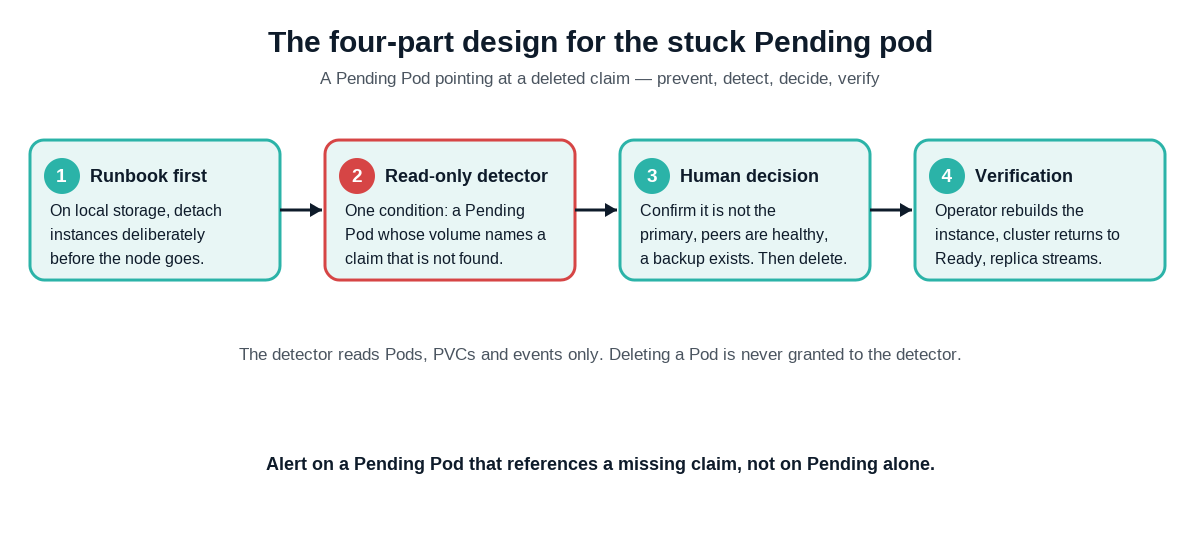
- 01
Prevention in the runbook
For planned node replacement on local storage, remove or detach database instances deliberately before the node goes, rather than deleting claims afterwards. The upstream report suggests destroying each instance with the cnpg plugin before draining; confirm the exact command in the plugin documentation for your version first.
- 02
A read-only detector
It looks for one condition: a Pending Pod in a database namespace whose volumes reference a PersistentVolumeClaim that is not found. It can be a CronJob, an alert rule or an agent such as Srenix, and it must stay read-only.
- 03
A human decision
Clearing the stuck Pod is a production change on a database cluster. In the reported scenario the Pod never ran, but a person should confirm it is not the primary, that the other instances are healthy and that a recent backup exists, because the operator will rebuild the instance from the current primary.
- 04
Verification
After the Pod is removed, the operator should create a fresh instance, a join job should run, and the cluster should return to Ready with the expected instance count. Re-run the detector and confirm the replica is streaming.
The detector needs read access to Pods, PVCs and events in database namespaces and nothing else. Deleting one Pod is granted to a human or an approval-gated agent, never to the detector.
Where Srenix fits
Srenix is an autonomous AI SRE for Kubernetes that runs inside your cluster. It is in beta with Design Partners, and places are limited. Per Reliora's current product material, it ships probes for pending pods, PVCs, nodes and CloudNativePG Postgres health, and it can be triggered by Kubernetes informers or by Prometheus alerts through Alertmanager. That maps onto the detector role: it can notice a Pending instance Pod, relate it to its claim and node, and write the finding as a Kubernetes resource you can read with kubectl get driftreports.
What stays outside Srenix is the decision and the fix. Deleting a Pending instance Pod is not one of its five built-in policy-bounded fixers, so the honest description is: Srenix diagnoses and proposes, a human approves in Slack. Autonomy is off by default, and below the 0.95 confidence floor it asks a human. Every action lands in a signed, hash-chained audit trail, and after any approved change it re-runs the check that caught the problem.
Srenix will not fix the operator bug, edit PVs or change storage provisioner behaviour, and it does not replace a rehearsed node-replacement procedure.
Implementation walkthrough
All names are illustrative. Run the read-only commands first; the one that changes production is marked.
Step 1: see what the cluster says (read-only). These come from the troubleshooting guide [2]. Look for an instance count below the desired count and any Pod in Pending.
kubectl cnpg status orders-db -n db
kubectl get pod -n db -l cnpg.io/cluster=orders-db -L role -o wide
kubectl get pvc -n db -l cnpg.io/cluster=orders-db
Step 2: find the missing claim (read-only, illustrative script). In the reported scenario the scheduling events mention a claim that is being deleted or not found. To check every Pending Pod:
kubectl describe pod orders-db-3 -n db
for pod in $(kubectl get pods -n db -l cnpg.io/cluster=orders-db \
    --field-selector=status.phase=Pending -o name); do
  for pvc in $(kubectl get $pod -n db \
      -o jsonpath='{.spec.volumes[*].persistentVolumeClaim.claimName}'); do
    kubectl get pvc $pvc -n db > /dev/null 2>&1 \
      || echo "$pod references missing PVC $pvc"
  done
done
Step 3: alerting (pseudocode). Fire when kube_pod_status_phase{namespace='db',phase='Pending'} == 1 holds for ten minutes, and route it through Alertmanager to whatever diagnoses it. The metric comes from kube-state-metrics; label names depend on your setup.
Step 4: remediation (changes production).
This deletes a Pod on a database cluster. Do it only after a human has confirmed the Pod is not the primary, the other instances are healthy and a backup exists.
kubectl delete pod orders-db-3 -n dbThe upstream report also mentions an annotation that marks an instance unrecoverable on recent patch releases. We could not confirm it in the documentation pages we consulted, so verify it against the docs for your exact version before using it.
Step 5: verify. Confirm the instance count is back to the desired value and the new replica is streaming.
kubectl wait --for=condition=Ready cluster/orders-db -n db --timeout=15m
kubectl cnpg status orders-db -n db
Tradeoffs and failure modes
- False positives. A claim may be briefly missing while another controller recreates it. Require the condition to persist for several minutes.
- A wrong diagnosis is costly. Deleting the stuck Pod is safe in the reported scenario because it never ran, but not if it were the primary or the only copy of the data. The human step is not optional.
- Rebuild cost. A rebuilt replica loads the primary and takes time proportional to database size.
- Storage type. With network-attached volumes the scenario mostly disappears, because the claim can follow the Pod.
- It may already be fixed in your release; reproduce it in a non-production kind cluster first.
How to validate
Acceptance criteria are targets, not measured results:
- The detector flags a Pending instance Pod with a missing claim within ten minutes.
- No flag is raised during a normal drain where claims are intact.
- After approved remediation the cluster returns to the desired instance count.
- The audit record shows who approved what and when.
Test plan: on a throwaway kind cluster with local-path storage and three instances, drain a node that hosts a replica but not the operator, delete that replica's claim while its Pod is Pending, and record whether the cluster recovers by itself. Run the detector, apply the remediation, time the recovery and re-run the detector. Repeat once with the claim intact to prove there is no false positive. Only then promote the alert rule.
The taking point
A database operator that waits is not always one that is healing. Alert on the specific cross-object condition, a Pending Pod pointing at a claim that does not exist, keep the fix behind a human decision, and prefer deliberate instance removal over deleting claims after a node is gone. If you want a diagnosis layer that runs inside your cluster and keeps this kind of check running, you can read more at reliora.ai.
Sources
[1] CloudNativePG documentation, Failure Modes (v1.30).
[2] CloudNativePG documentation, Troubleshooting guide (v1.29).
[3] Kubernetes documentation, Safely Drain a Node.