
An ExternalSecret that fails during a short outage is supposed to try again. Two recent public issue reports describe the opposite: Secrets that quietly stopped syncing, with a healthy-looking store and no alert until something broke. This post turns those reports into a small, testable watch-and-recover design for teams that sync secrets into Kubernetes with External Secrets Operator (ESO).
The design is a proposal. It has not been run on a cluster, and nothing here is a measured result.
The problem
When ESO cannot reach a secret backend, the ExternalSecret goes not-ready and the target Secret keeps its last good value. That is the right default. The trouble is what happens next. The ESO API reference says an ExternalSecret is Ready only if the target Secret exists and was refreshed within the last refresh interval, and that Ready turns False when the last refresh fails [1]. It does not describe how retries or backoff work, so a team cannot assume a failed object will be tried again soon.
Two independent public reports, from separate small platform projects, show the consequences. In one, a one-replica cluster DNS service was down for about fourteen minutes. ESO failed fourteen ExternalSecrets in that window. Twelve of them were never retried, and they missed even their hourly refresh for more than a day, while the ClusterSecretStore stayed Ready the whole time. The reporter could not confirm a root cause. In the other, an AppRole SecretID used by ESO hit its 30-day lifetime. Logins failed, the secret backend's lockout engaged, and every ExternalSecret in the cluster went stale at once. The first signal was the outage itself.
The causes differ, but the failure class is the same: sync stops, the Secret object still exists, and nothing pages anyone. Two reports are not a trend, and these are small installations. They are enough to justify a cheap guardrail.
Why existing approaches fall short
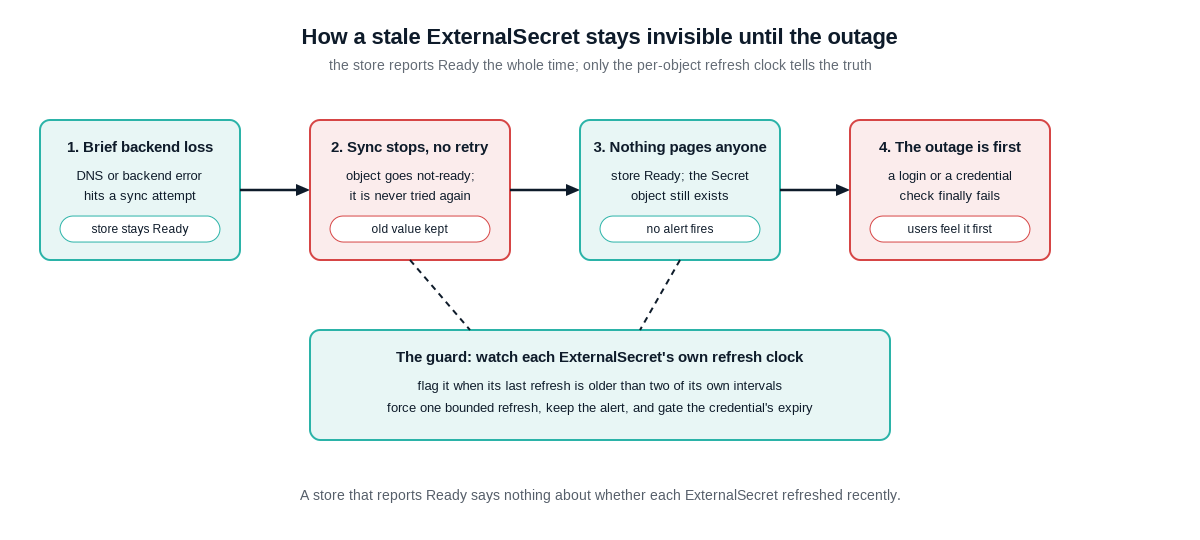
Most teams watch the store, not the individual ExternalSecrets. A store that reports Ready says the credentials worked at some point; it says nothing about whether each ExternalSecret has refreshed recently. ESO exposes metrics for this, including a per-ExternalSecret status condition, sync error counters and per-store status conditions [2], but the documentation lists no labels for them, so alert rules need checking against your own version.
Staleness also hides behind the consumer. Kubernetes updates Secrets mounted as volumes on an eventually-consistent basis, and a container that uses a subPath mount does not receive automated updates [3]. An old value can therefore live on in a running pod long after the source changed.
Finally, credential expiry is a calendar problem. Backends such as OpenBao attach lifetimes to AppRole SecretIDs, and enable a user lockout by default, with a documented threshold of five failed attempts and a fifteen-minute duration [4]. Rotating after the fact does not remove a lockout that has already started.
A practical solution architecture
Solution label: Proposed architecture. Three layers, each with one job.
Note: the detector reads only status fields from the Kubernetes API. The refresh annotation is the only write, and secret values are never read.
- 01
Staleness detector
Compare each ExternalSecret's last refresh time with its own refresh interval and flag anything older than two intervals, regardless of the store state.
- 02
Bounded recovery
For objects stale while their store is Ready, trigger one manual refresh with the documented annotation. Cap it at one attempt per object per hour, stop if the condition does not clear, and log every attempt.
- 03
Credential expiry guard
Rotate the backend credential ESO itself uses well before its lifetime ends, with a separate alert on remaining lifetime. This layer lives in your secret backend and CI tooling.
Where Srenix fits
Srenix is an autonomous AI SRE for Kubernetes that runs inside your cluster, and it is in beta with Design Partners, whose places are limited. Its public demo shows diagnostics such as an unready ExternalSecret, and its triggers include Kubernetes events, Alertmanager and a scheduled resync. Srenix says it never reads or writes secret values. That makes it a reasonable home for the detector and the evidence side of layer two: it can notice the unready object, explain it, and, within a policy you set, propose a re-sync from the secret store for approval or, if you allow it and every safety check passes, apply it. It then re-runs the same detection to confirm the object cleared.
What stays outside Srenix: any ESO defect, your DNS or backend availability, credential rotation, and the expiry guard in layer three. Re-syncing a secret is not one of the five default fixers; treat it as a policy-gated action you configure and review, not a default. Every action lands in a signed, hash-chained audit trail.
Implementation walkthrough
These commands are read-only unless marked.
# List ExternalSecrets with readiness and last refresh time
kubectl get externalsecrets -A \
  -o custom-columns=NS:.metadata.namespace,NAME:.metadata.name,READY:.status.conditions[0].status,REFRESHED:.status.refreshTime

# Check store health separately
kubectl get clustersecretstores
kubectl get secretstores -A
To recover one stale object, use the annotation from the ESO reference [1]. This changes production state, because it forces a fetch and rewrite of the target Secret:
kubectl annotate es my-es -n my-namespace force-sync=$(date +%s) --overwrite
kubectl get es my-es -n my-namespace -w
Pseudocode for the detector, to adapt to your tooling:
for each ExternalSecret es:
  interval = es.spec.refreshInterval        # skip if zero: created once by design
  age = now - es.status.refreshTime
  if age > 2 * interval and store(es) is Ready:
      if attempts(es, last_hour) < 1:
          annotate es force-sync=
      alert(es, age)
After a refresh, remember consumers. A pod that reads the Secret through an environment variable or a subPath mount needs a restart to see the new value, which you can do with kubectl rollout restart deployment/. Treat that as a separate, deliberate step.
Tradeoffs and failure modes
Forcing a refresh can mask a real backend problem, so keep the alert even when recovery works. A refresh on a store that is truly down just fails again, which is why the one-attempt cap matters. Refresh intervals of zero are valid and mean the Secret is created once [1]; the detector must skip them. Frequent forced syncs add load on the secret backend and may hit provider rate limits. The staleness threshold of two intervals is a starting guess, not a tuned value. And an automated action on secrets deserves human approval until you have watched it behave.
How to validate
Run these in a non-production cluster. The targets are acceptance criteria, not results.
- Detection. Stop cluster DNS or block the backend for ten minutes, then restore it. Every ExternalSecret that fails to refresh should be flagged within two refresh intervals.
- Recovery. After restoring the backend, every flagged object should return to Ready within one cycle of the guard, with at most one forced refresh each.
- Expiry. Set a short credential lifetime on a test role and confirm the alert fires before expiry and the scheduled rotation completes before the lifetime ends.
- Safety. Confirm the detector never reads Secret data, and that every action appears in the audit log.
Conclusion
Watch each ExternalSecret, not just the store, and treat credential lifetime as a calendar item with an alert. If you want a cluster-resident agent to help with the detection and the bounded recovery, see how Srenix approaches it.
Sources
- External Secrets Operator, ExternalSecret API reference — the ESO API reference
- External Secrets Operator, metrics — the ESO metrics reference
- Kubernetes documentation, Secrets — the Kubernetes Secrets documentation
- OpenBao documentation, AppRole auth method — the OpenBao AppRole documentation