
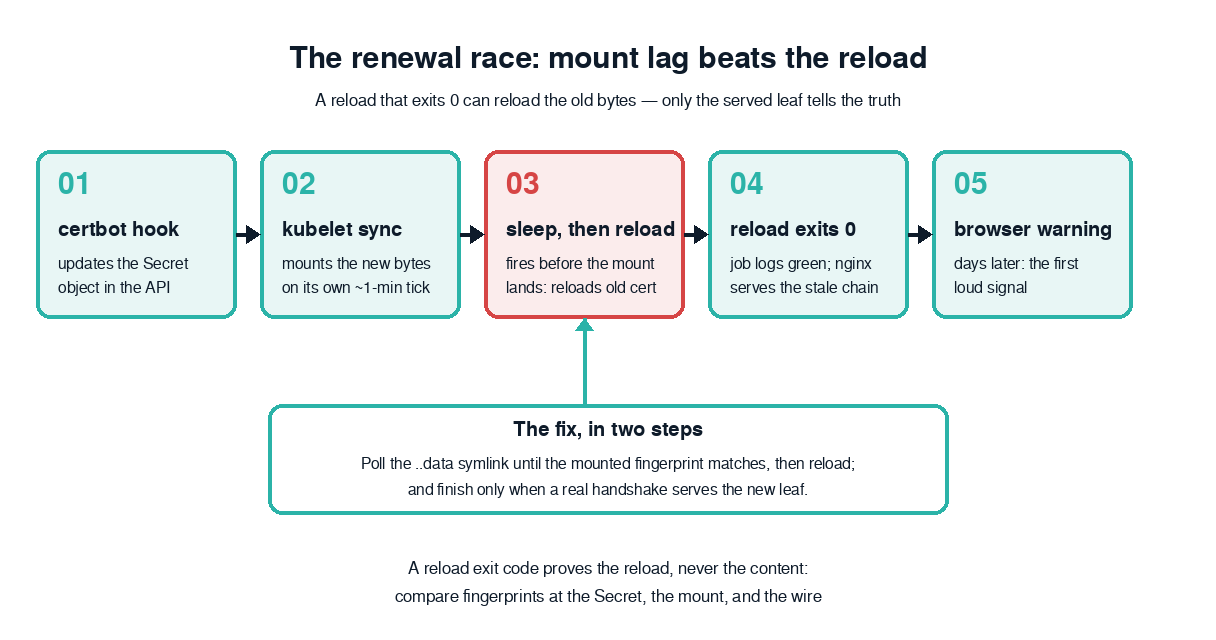
The browser warning is the first loud thing. The renewal that should have prevented it looked flawless: certbot wrote a new certificate into the Secret, the hook ran nginx -s reload, the reload exited 0, the renewal job logged green. nginx had kept serving the old certificate the whole time. The reload had raced the kubelet and lost. Secret volumes in a pod are not updated when you update the Secret object; the kubelet refreshes them on its own sync schedule. Reload before that refresh lands, and nginx re-reads the same old files, reports success, and keeps serving the stale chain. This post shows why the race exists, how to confirm it, and how to close it.
How the mount actually updates
When a container reads the mounted certificate, it reads a file the kubelet wrote into the pod's bind mount, not a live view of the API object. The official docs put the delay at the kubelet sync period (1 minute by default) plus a cache propagation delay, which depends on the kubelet's config-map-and-secret cache setting:
- Watch (the default): the extra delay after the sync tick is usually small.
- TTL cache / API-only: up to the configured TTL on top.
Two properties follow that trip people up. The delay is eventually-consistent, with no published upper bound: a busy node or a slow API server stretches it. And nothing inside the pod learns which version landed — no status field, no annotation, and a reload's exit code says nothing about content; a reload that reloaded stale bytes is still a successful reload. The mount itself swaps atomically through the ..data symlink: the kubelet writes a new dated directory and flips the link. That atomicity is what makes a fix possible.
How to confirm the race
Before changing anything, prove which side of the race you lost.
# 1. What the API object holds (generation/resourceVersion + notAfter)
kubectl get secret app-tls -n prod -o jsonpath='{.metadata.resourceVersion}'
kubectl get secret app-tls -n prod -o jsonpath='{.data.tls\.crt}' \
  | base64 -d | openssl x509 -noout -enddate

# 2. What the pod's mount holds — compare the fingerprint, not mtime
kubectl exec deploy/router -n prod -- \
  openssl x509 -in /etc/ssl/app/tls.crt -noout -fingerprint -sha256

# 3. What the endpoint actually serves to clients
echo | openssl s_client -connect app.example.com:443 \
  -servername app.example.com 2>/dev/null \
  | openssl x509 -noout -fingerprint -sha256
If the fingerprint in step 2 differs from step 1, the mount lagged: the reload ran against old bytes. If step 2 matches but step 3 differs, the problem is above the mount — a reload that never reached a worker, or a second proxy with its own copy. Compare fingerprints, never file dates: the dated-directory swap can present a fresh mtime on old content. To measure the lag on your own clusters: write a marker to a Secret, poll the mounted file once a second, and record when the fingerprint changes. On a quiet node the answer is usually near the one-minute sync tick; on your busiest node it gets worse.
Making the sequence deterministic
Three changes, in order of how much they buy:
- 01
Wait for the mount, then reload
After the certbot hook updates the Secret, poll the mounted certificate (via the
..datasymlink) until its SHA-256 fingerprint equals the fingerprint of the new Secret payload — with a hard timeout. Reload only after they match. Fixed sleeps lose this race exactly when the node is busiest, which is when a renewal is most likely to be late anyway. - 02
Verify the served leaf, not the reload
After the reload, make one real TLS handshake and compare the served leaf fingerprint with the certificate you just wrote. Mark the renewal done only on a match. A green renewal job that never proved the wire is how a one-month-old certificate survived: every signal in the loop was about the job, not about the client-facing result.
- 03
Or push the change through the config
If a reload race on a certificate is unacceptable, stop relying on in-place Secret mounts: render the Secret into the pod template as a checksum annotation so a rotation rolls the pod instead of reloading it, or run the renewal through an ingress controller that watches the Secret itself. Trade-off: you pay a pod restart (or a new controller) to buy an ordering guarantee; the polling fix keeps in-place reloads and adds a wait.
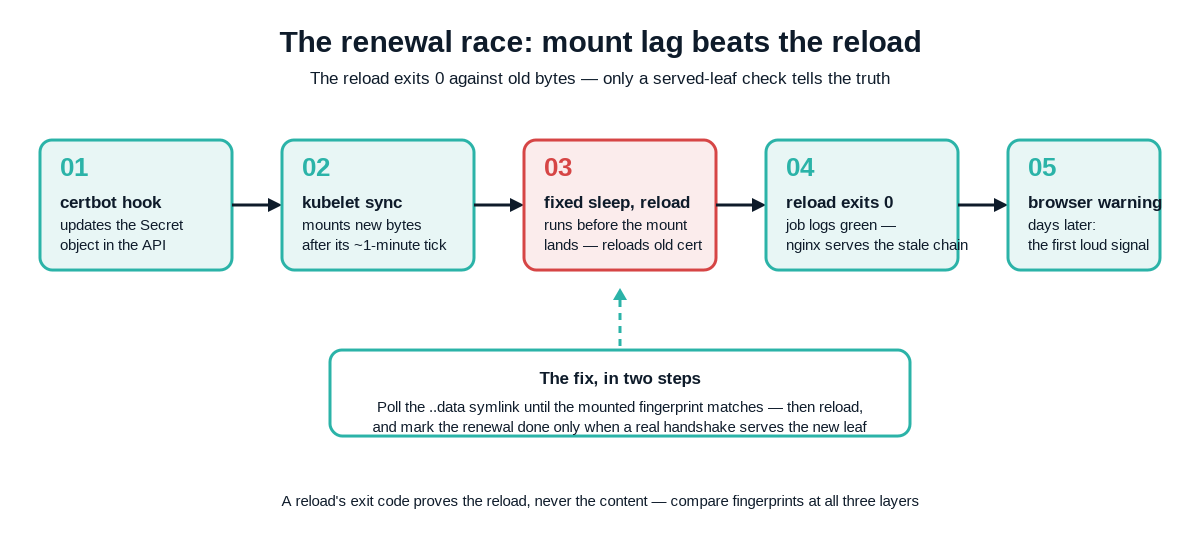
Option 1 makes the reload correct but not fast: the mount still lands on the kubelet's schedule, so rotations take about a minute longer end to end. If that does not fit your deadline, use option 3.
Why it hides
The failure is quiet at every layer. The Secret update succeeds. The reload exits 0. The renewal job logs success. nginx's error log stays empty because it is serving a valid certificate — the wrong one. The first loud signal is a browser warning, which is the customer's problem, not an alert. What to change so it hides less:
- Alert on the served certificate from outside: a synthetic TLS handshake per exposed host, alerting on expiry or on a fingerprint that never changes after a renewal.
- Treat "the reload succeeded" as an unverified claim in every runbook that touches mounted Secrets — certificates, client CAs, kubeconfigs.
- Note the same lag applies to every Secret and ConfigMap volume: anything that hot-reloads from a mount (auth files, feature flags) can race the kubelet the same way.
Srenix watches the certificate side of this from the cluster and the outside: it flags a cert-manager Certificate that is not Ready, expired, or inside 14 days of expiry, and it probes every Ingress host's real TLS endpoint, alerting on the second consecutive failure. It does not watch a Secret volume inside a running pod and does not reload nginx for you — the mount race shown here lives between the kubelet and your container, and only the in-pod fix closes it.