

A database runs out of disk, and the obvious fix, make the volume bigger, does not work. A controller that refuses to act when the disk is full can trap you in a loop where the fix is gated behind the failure.
A recent open issue on the CloudNativePG operator describes this. When a cluster's PersistentVolumeClaim is full, the operator stops reconciling it. Changing the requested size on the Cluster resource has no effect on the claim, so the documented path reported there is to resize the PVC by hand and then update the Cluster to match. A related report covers the write-ahead log volume: once it fills, a guard in the controller blocks the reconcile step that would have grown it, and the cluster stays in a not-enough-disk-space state. In some cases the pod also crash-loops, because Postgres cannot write. These are user reports, not documented behaviour, and fixes may land in later releases. Check your own version.
Why the operator refuses to grow the volume
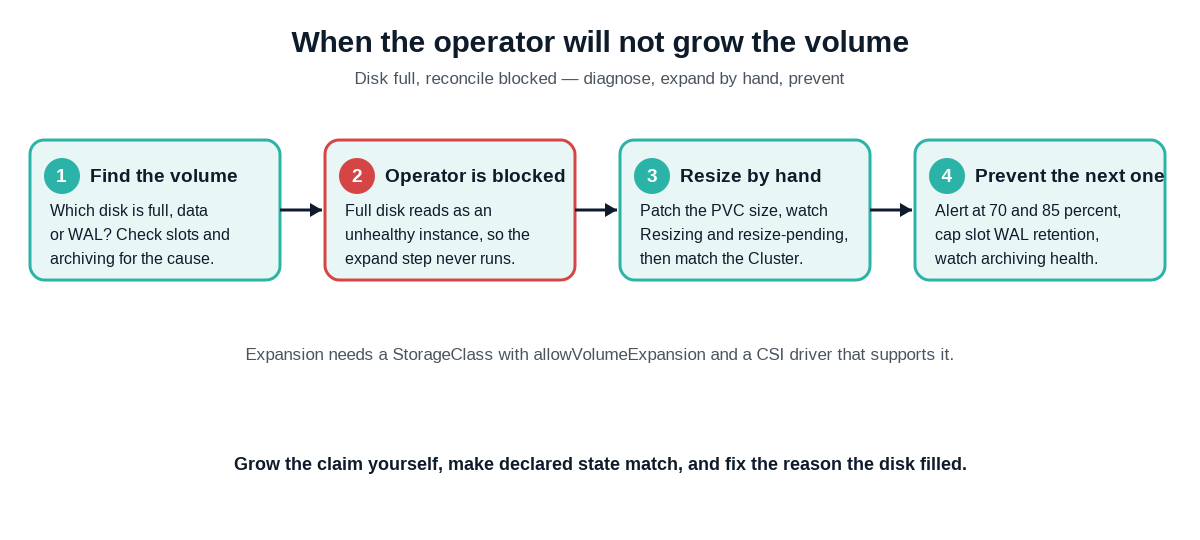
Operators protect databases. When a volume is full, the safest default is to stop touching anything, because a half-applied change on a Postgres instance that cannot write can confuse failover. So the controller sees a full disk, concludes the instance is unhealthy, and short-circuits before it reaches the step that expands storage.
The real cause of the full disk is usually boring. WAL files pile up because archiving is failing or slow. A replication slot retains WAL for a replica or consumer that has stopped. A long transaction or heavy batch job grew the data faster than forecast. Or the volume was sized for last year.
Online expansion also needs a StorageClass with allowVolumeExpansion set to true, a CSI driver that supports it, and often a filesystem resize when the pod next mounts the volume. Any one missing turns a five-minute task into a long afternoon.
Layer one: find out which volume is full, and why
Solution label: Proposed architecture. Work in three layers: find the cause, grow the volume, then fix why it filled. The first layer is read-only:
kubectl get cluster -n <namespace>
kubectl describe cluster -n <namespace> <name>
kubectl get pvc -n <namespace>
kubectl exec -n <namespace> <pod> -c postgres -- df -h /var/lib/postgresql/data /var/lib/postgresql/wal
kubectl describe pod -n <namespace> <pod>
kubectl logs -n <namespace> <pod> -c postgres --previous
If the pod will not start, read its events and previous logs, since an out-of-space Postgres usually says so plainly. Check WAL retention too. Archiving failures and abandoned replication slots are common reasons WAL volumes balloon. Look at archive status in the Cluster conditions and at any slots that show as inactive.
Layer two: expand in the right order
First confirm the StorageClass allows it:
kubectl get storageclass -o custom-columns=NAME:.metadata.name,EXPAND:.allowVolumeExpansionThis changes storage on a production database and costs money. Get the size increase approved first, and confirm a recent backup exists.
Then patch the claim directly, which is the step the operator would have done if it were not blocked:
kubectl edit pvc -n <namespace> <pvc-name> # raise spec.resources.requests.storage, for example to 100GiWatch for the Resizing and FileSystemResizePending conditions on the PVC, and restart the pod only if the filesystem resize is waiting on one. Afterwards, update the size in the Cluster spec so declared and real state match. If you skip that, the next reconcile may fight you, or a later GitOps sync may revert your intent.
Layer three: prevention
- Alert on volume usage at 70 and 85 percent, per volume, with data and WAL separate.
- Cap the WAL a slot may retain so one dead consumer cannot eat the disk.
- Monitor archiving health, not just disk.
- Size for growth with a margin, and decide in advance who may approve a volume increase.
- Track the upstream fix and upgrade when it lands, and rehearse the manual procedure in a test cluster.
Where Srenix fits
Srenix is an autonomous AI SRE for Kubernetes that runs inside your cluster as an operator. It is in Beta with Design Partners. Full disks are one of its headline use cases, and it has dedicated probes for PVCs and for CloudNativePG Postgres.
The value is timing: it can see disk pressure building before eviction or a write failure, so the PVC can be expanded while the operator is still willing to reconcile. If it arrives late, it still reads the cluster and PVC state, identifies which volume is full, flags the storage class constraint, and points at a likely cause such as an inactive replication slot or failing archiving.
The fix it proposes is expanding the volume, for example from 50Gi to 100Gi. Because that spends money, it needs a one-tap approval: a signed, single-use, expiring link posted to Slack, where your SSO decides who can click. It does not apply on its own. After the change, Srenix confirms writes succeed and that the database and its metrics scrape are healthy, and records each step in a hash-chained audit trail.
What Srenix will not do: patch the operator, drop replication slots, or edit WAL files, or cure the cause of the growth. Those stay with your team. It also never reads or writes secret values.
Tradeoffs and failure modes
- Volume expansion is one-way. You cannot shrink a PVC, so size the increase deliberately.
- Unsupported storage. Without
allowVolumeExpansionor CSI support, you need a different path such as restoring to a larger volume. - Treating the symptom. Growing the disk without fixing archiving or a dead slot only delays the next outage.
- It may already be fixed in your operator release; reproduce in a test cluster first.
How to validate
Acceptance criteria are targets, not measured results:
- Usage alerts fire at the 70 and 85 percent thresholds for data and WAL separately.
- After expansion the PVC reports the new capacity and the Cluster spec matches.
- Writes succeed and the instance is Ready.
- The cause (archiving, slot or growth) is identified and recorded.
Test plan: in a throwaway cluster with an expandable StorageClass, fill a small WAL volume, confirm whether your operator version blocks reconciliation, apply the manual procedure, and time the recovery.
The taking point
When the operator will not grow the disk, grow the claim yourself, then make the declared state match and fix the reason it filled. Srenix is in Beta with Design Partners; if full volumes are a recurring page for you, see reliora.ai for the use case and the Design Partner programme.