
A certificate renewal fails once, and then nothing happens. No retry, no error page, no alert. The Certificate sits in a not-ready state, the Order behind it stays Pending, and the clock on the old certificate keeps ticking.
In a recent open bug report against cert-manager, a team renewing a wildcard certificate over a DNS-01 challenge found their Order had been Pending for more than a day. The Challenge underneath it was already marked expired, because the ACME server had answered that the challenge no longer existed. The controller kept reconciling every few seconds, kept reading the same Pending status back, and kept logging that it was waiting for the server to update the Order. It was waiting for a change that was never going to come.
Why the renewal loop never exits
ACME issuance is a chain of objects: Certificate, CertificateRequest, Order, Challenge. Each one only moves when the object below it reports a final state. Most failures resolve themselves, because a failed Challenge flips the Order to invalid and cert-manager backs off and creates a new one.
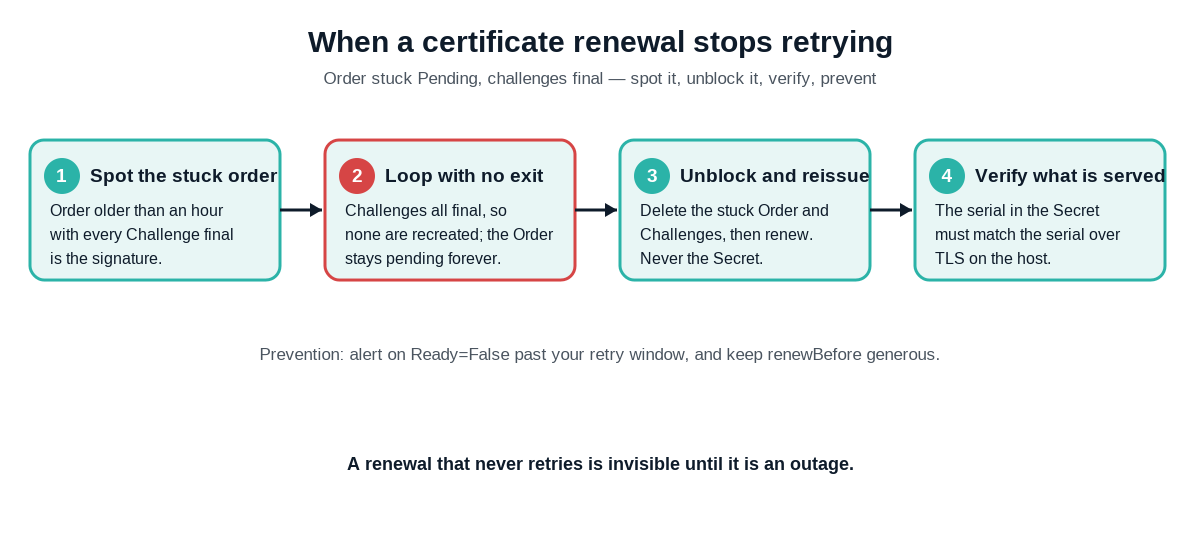
The stuck case is a mismatch between what cert-manager believes and what the CA believes. The Challenge on the cluster side is in a final state, but the CA still reports the Order as pending, and the Challenge on the CA side has been garbage collected or has timed out. cert-manager sees every challenge as final, so it does not recreate them. It sees the Order as pending, so it does not mark it failed. Both answers are individually reasonable, and together they produce a loop with no exit.
Plausible triggers include a DNS provider API that was briefly unavailable while the TXT record was created or cleaned up, a propagation check that outlived the CA's authorization window, a controller restart in the middle of validation, or a wildcard certificate where a single authorization carries the whole order. None of these are exotic. This is a user report of controller behaviour, not documented behaviour, so check your own version.
Layer one: see the stuck order before expiry
Solution label: Proposed architecture. Think in three layers: see it early, clear it safely, make it less likely. Alert on the renewal window, not on expiry. A Certificate is normally renewed well before it expires, so a certificate past its renewal point that still has the same serial is already a problem. Check the whole chain, not only the Certificate:
kubectl get certificate -A
kubectl get certificaterequest,order,challenge -A
kubectl describe order -n <namespace> <order-name>
kubectl describe challenge -n <namespace> <challenge-name>
kubectl logs -n cert-manager deploy/cert-manager --since=1h | grep -i order
Look at the Order age. A healthy Order finishes in minutes. An Order older than an hour with every Challenge in a final state is the signature of this problem. The controller log shows the repeated waiting line.
Layer two: the safe unblock
The old certificate is still being served, so you are not in an outage yet. Delete the stuck Order and its Challenges, not the Certificate or its Secret.
This changes production certificate state. Confirm the old certificate has days left and that you have the DNS provider credentials working before you delete anything.
kubectl delete order -n <namespace> <order-name>
kubectl delete challenge -n <namespace> <challenge-name>
cmctl renew <certificate-name>
cert-manager notices the Certificate still needs issuing, creates a fresh CertificateRequest and Order, and starts again with new challenges. If the cause was a transient DNS failure, it should succeed. If the cause is persistent, you should see the new Challenge fail with a readable reason instead of hanging, which is itself progress.
Then verify what users actually see, not the Kubernetes object. A Ready Certificate proves the Secret was updated. It does not prove the Ingress or gateway is serving it:
kubectl get secret <tls-secret> -n <namespace> -o jsonpath='{.data.tls\.crt}' | base64 -d | openssl x509 -noout -serial -enddate
echo | openssl s_client -connect <host>:443 -servername <host> 2>/dev/null | openssl x509 -noout -serial -enddate
The two serial numbers must match. If they do not, a pod needs to reload, or an Ingress points at the wrong secret.
Layer three: prevention
- Keep DNS-01 credentials narrowly scoped and tested, so API failures are rare.
- Keep
renewBeforegenerous enough that a failed first attempt still leaves days, not hours. - Alert on certificates whose Ready condition has been False for longer than your retry window.
- Upgrade cert-manager regularly, since stuck-state handling may have improved in later releases.
- Rehearse the delete-the-Order procedure in staging so nobody is learning it live.
Where Srenix fits
Srenix is an autonomous AI SRE for Kubernetes that runs inside your cluster as an operator, and certificates stuck in renewal are one of its headline use cases. It is in Beta, and we are working with Design Partners now. It watches cert-manager objects through Kubernetes events and can notice that an Order has been Pending far longer than a healthy one, which is the signal described above.
Most findings are explained by plain rules with no AI involved, so the report names the Certificate, the Order, the expired Challenge and the age of each. The report appears as a Kubernetes resource you can read with kubectl get driftreports, and goes to Slack if you have connected it.
For the fix, the safe action is the one you would take by hand: clear the stuck request so cert-manager reissues. Removing a finished or stuck certificate request is one of Srenix's five built-in fixers, each with a rollback. It runs only if you have turned autonomy on and listed that action kind as allowed, and it passes a seven-check gate that includes protected namespaces and a confidence threshold. Anything outside that, or below the gate, becomes a proposal a human approves with a signed, single-use link in Slack. Afterwards it re-runs the original detection and checks that the certificate being served is the new one, and every step is written to a hash-chained audit trail.
What Srenix will not do: it will not fix a broken DNS provider token, repair your registrar, or change your CA relationship. If the cause is persistent, the new Challenge will fail with a clear reason and Srenix will report that rather than looping.
Tradeoffs and failure modes
- Deleting the wrong object. Removing the Certificate or its Secret instead of the Order would drop the certificate you are still serving. Delete only the Order and Challenges.
- Persistent causes. A bad DNS token or a rate-limited CA will fail again; the unblock only buys a clearer error.
- False positives. A slow but healthy issuance can exceed an hour on a busy DNS provider, so tune the age threshold to your environment.
- It may already be fixed in your cert-manager release; reproduce in staging first.
How to validate
Acceptance criteria are targets, not measured results:
- An Order that is older than your threshold with all Challenges final raises an alert before the renewal window closes.
- After clearing the Order, a new Order is created and the Certificate returns to Ready.
- The serial served over TLS matches the serial in the Secret.
- A normal renewal produces no alert.
Test plan: in a staging cluster, simulate a DNS-01 failure during a renewal (for example by revoking the DNS credential mid-validation), confirm the alert, apply the procedure above, restore the credential, and verify the served serial.
The taking point
A renewal that never retries is invisible until it is an outage. Alert on Order age and renewal window, clear only the stuck Order and Challenges, and verify the certificate users actually receive. Srenix is in Beta with Design Partners; if renewals you cannot see are a risk on your clusters, you can read more at reliora.ai or apply for the Design Partner programme there.